Empty State UX Design for Each Reason a Screen Is Empty
A list can be empty because nothing has been added yet, because the filters match nothing or because the data failed to load. Why each one needs its own words and next step, and how I hand them over in Figma.
 Mike Lopez
Designs and builds websites and B2B software
Mike Lopez
Designs and builds websites and B2B software

On this page
I think the most useful habit which I have in empty state UX design is to give every reason that a screen can be empty its own design. An orders list is empty on a new account because nothing has been added yet, it is empty after a search because the filters match nothing, and it can look empty because the request failed, so each of those needs its own words and its own next step.
The third one is really the one which costs money, because a failed load which says “No orders” looks exactly like a quiet morning, and then someone on the team makes a decision on a list which only looks empty.
Why one empty screen is the usual default
When a design file only has the finished screens, the empty state is left to the developers, and it mostly becomes one component with an icon and the words “No data”. That is understandable, because a new account, a filter which matches nothing and a failed request can all reach the screen as an empty list, so unless the design says which is which, the build has no reason to tell them apart.
IBM’s Carbon Design System makes the same split in its empty states pattern, with one type for first use, one for the result of something the person did, such as a search, and one for errors, permissions and configuration, and it notes that empty states are “often treated as an afterthought”, which I suppose happens because nobody sees them in a demo, where every account is already full.
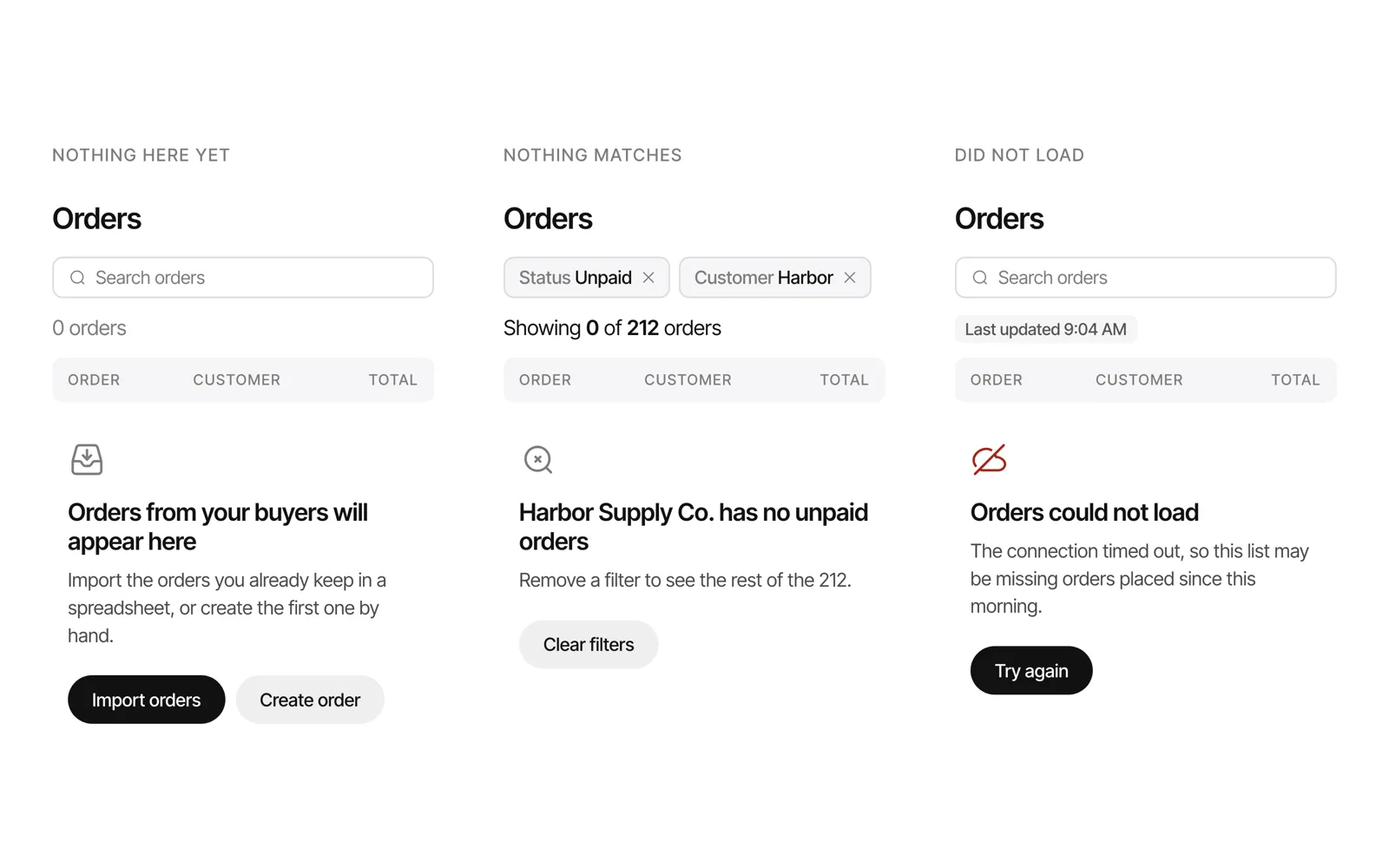
The empty states which a B2B screen needs
Three of these belong to every list and table, and the last two appear once a tool has approval queues or several roles, so I would check a product against the whole table before deciding which ones it needs.
| Kind of empty | What happened | What the screen says | The next step |
|---|---|---|---|
| Nothing here yet | A new account, or a feature which nobody has used yet | What will appear here, in the product’s own words | Create the first record, or import the ones in a spreadsheet |
| Nothing matches | Filters or a search which exclude every record | The filters which are on, and the count against the total | Clear the filters, or remove the one which was too narrow |
| Did not load | A failed request, a timeout or an integration which is down | That the list could not load, and when the data was last current | Try again, or open the last good copy |
| All done | Every item in a queue has been dealt with | That the work is finished, as good news | A link to the history, or nothing at all |
| No access | The person’s role limits what the view shows | That the view is limited, and who can widen it | Ask an admin, by name where the product knows it |
Nothing here yet
This is the one which most teams do design, because it is the first thing a new customer sees, and I think it should teach rather than apologise, which is how I described it in my SaaS dashboard redesign case. So it says what will appear on the screen once there is data, in the product’s own nouns such as orders, invoices and buyers, and it offers one action which would fill it. In B2B products that action is often an import, because a new customer mostly arrives with years of records in a spreadsheet, and asking them to type the first order by hand is a slow way to show them the product.
I would also keep the table header on screen above the message, so the page already has the shape which it will have once the orders arrive, and the person can see which columns their data will fill.
Nothing matches the filters
In this case the records exist, so the screen should say so, and I keep the filter chips and the count in place, so that “Showing 0 of 212 orders” sits right under the chips which caused it and the fix is one control away, either clearing everything or removing the one chip which was too narrow. The mistake which I would watch for is the first-use message appearing here, because an account with 212 orders which says “Create your first order” makes people think that their data is gone.
It’s really the same habit as the filters you can see in my data table UX design post, applied to the moment when the filters hide everything. For people using a screen reader the new count should be announced when it changes, which is what WCAG 2.2 success criterion 4.1.3, Status Messages asks for, and its own example is the count of results which appears after a search.
The data did not load
This one should never borrow the empty design, because it is an error which happens to have no rows, and in B2B software it is the one which does the damage. A team which reads “No unpaid invoices” when the request timed out would reasonably stop chasing payments that morning, so the screen says that the list could not load, shows when the data was last current, such as “Last updated 9:04 AM”, and offers to try again, because people decide differently on data which is late and data which is missing.
All done, and no access
Approval queues and task lists also need an all-done state, which should read as good news, such as “All 14 approvals are done for today”. Tools with several roles need a no-access state too, which says that the person’s role limits the view and who can widen it, because an operator who sees an empty list where the supervisor sees forty records would think that the list is broken.
How I design and hand them over in Figma
I mostly design the empty, loading and error states before the screen where the data is right, which is the order I set out in my B2B dashboard design principles, because everybody already imagines the full screen and the questions come from the empty ones. I write the words for each state first, since an empty state is mostly a title, one line and one button, and I keep any illustration small, because on a screen which people open all day the picture stops being read within a week.
In the Figma file each list has its frames side by side, the full version first and then one frame for each kind of empty, named after its cause, such as Orders / Nothing yet, Orders / No match and Orders / Failed. Next to each frame I write the condition which shows it, such as a new account with no orders or a request which timed out, because the front end has to tell those apart, so the decision is made in the design before anyone builds the screen.
Frequently asked questions
What is an empty state in UX design?
An empty state is the screen which a person sees when a list, table, dashboard or panel has nothing to show, and in UX design it covers the words, the layout and the next step for that moment. I think the useful definition includes the reason, because a screen can be empty on a new account, after a search or after a failed load, and each of those would need its own design.
What should an empty state say?
It should say what happened and what the person can do next, in the product’s own words, so a first-use state names what will appear and how to add it, a no-match state names the filters and the count, and an error names the failure and when the data was last current.
What is the difference between an empty state and an error state?
An empty state means the request worked and there is nothing to show, and an error state means the request failed, so the screen does not know whether there is anything to show at all. I would design them separately and make sure that the error never uses the empty design, because that is how a failed load ends up reading as “No orders”.
How many empty states does one screen need?
For a list or table in a B2B product I would plan three at least, which are nothing yet, nothing matches and did not load, and then add all done for queues and no access for tools with several roles, so one list in a brief would mostly become four to six frames in the file, and I think that count is worth agreeing before the design starts.
If your empty screens all say No data
If you send me screenshots of one list in your product, in each of the states which you can reach, I will tell you which of these kinds of empty it is missing and what I would write for each one. You can see the product work which I have done in my case studies, and a UX audit is usually where I would suggest we start.