Dental Clinic Website in the Philippines, From the Book Button to the Chair
For a new patient, a clinic website has one job, which is a booking, and the path from the button to the chair mostly breaks where the owner never looks. What I found on eight Metro Manila clinic websites, and how to test yours.
 Mike Lopez
Designs and builds websites and B2B software
Mike Lopez
Designs and builds websites and B2B software

On this page
For a new patient, a dental clinic website mostly has one job, which is to take them from deciding that the clinic looks right to a booked appointment, and I think the path between those two points breaks more often than anything else on the site. It breaks quietly, because the people who run the clinic already know how to book, so they rarely book through their own website, and a patient who meets a broken step mostly leaves without telling anyone.
What I found on eight clinic websites in Metro Manila
This month I went through the websites of eight clinics in Metro Manila, where I’m based, a dental group with branches around Metro Manila among them, along with skin, aesthetic and hair clinics, and on four of the eight the path to a booking broke before a patient could reach anyone.
- A booking button in the main menu led nowhere, because its link had been left as a placeholder.
- A consultation button opened the old http version of the site, which had no redirect to the secure one.
- A contact page held one line, a link to the clinic’s Facebook page, with no form, phone number or email address.
- A free consultation page asked visitors to fill in the form below, and the page had no form on it.
Two more sent phones the desktop layout shrunk to fit the screen, and one printed its phone numbers as plain text, so a patient on a phone had to copy the number before they could call it. Most of these only show when someone actually tries to book, and each one costs a booking which the clinic never hears about.
The path from the book button to the chair
I would think of the booking path as five steps, from the moment a patient looks for the button to the moment they know their time, and each step has its own way of breaking.
| Step | What breaks | How I would check it |
|---|---|---|
| Finding the button | The button reads differently in the header, the hero and the footer, or it disappears on phones | Look for it on a phone, on the homepage and on a treatment page |
| Choosing a branch | Every branch page’s button opens the first branch’s booking | Tap the button on each branch page and read which branch the booking names |
| Choosing how to book | The form, the Messenger link or the phone number leads to a placeholder, an old address or a page without a form | Tap each one on a phone, on mobile data |
| Sending the request | The form delivers to an inbox which nobody reads, or fails without saying so | Send a test booking and find where it arrived |
| Hearing back | The patient sees a blank thank-you and no next step | Read the message after sending, and time the clinic’s reply |
One button, one destination
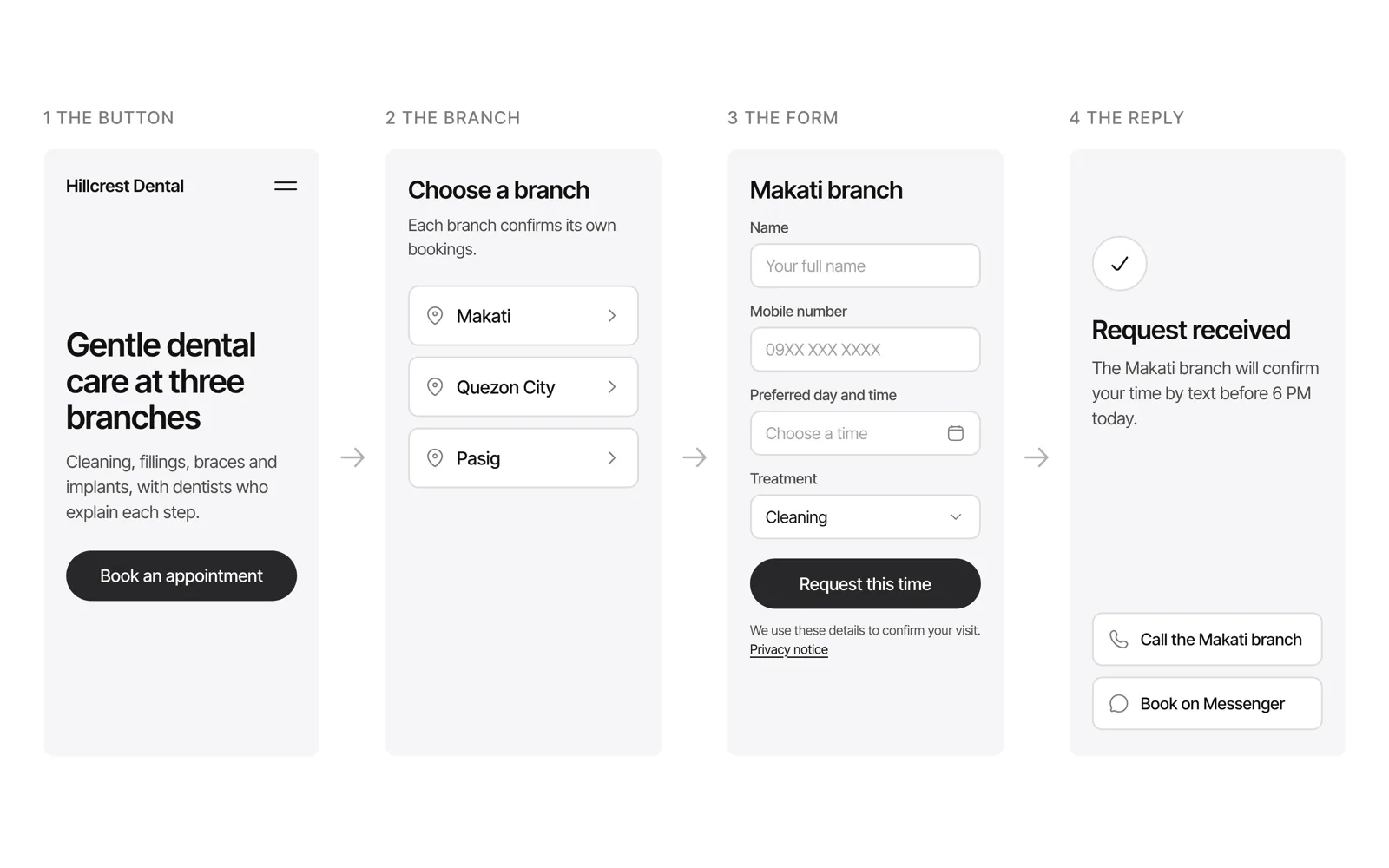
I would give the booking button one label and one look wherever it appears, so a patient learns it once, which is the same reasoning as in my post on website button hierarchy, where the main action on every page uses one style. With several branches, I think the choice of branch belongs at the start of the path, and every branch page’s button should open that branch’s own booking, which is where a copied page mostly goes wrong, as I found in an audit of location pages where 20 of 25 buttons pointed at the first location.
A form, Messenger or a call
A clinic mostly takes bookings in more than one way, so I would offer the ones which your front desk actually answers and make each of them work in one tap. A phone number should be a tap-to-call link, which a phone dials as soon as it’s tapped, and a Messenger button can open a conversation with your page through an m.me link, which Meta provides for linking from your website.
The form should sit on the secure https version of your site, because since Chrome 70 the browser has shown a red not secure warning when someone types into a page served over http, which is the last thing a patient should see while they give you their mobile number. It’s also why the old http address of the site should redirect to the secure one, since old links and bookmarks keep pointing at it for years.
What the booking form should ask
I would keep the form to what the appointment needs, which is a name, a mobile number, the branch, a preferred day and time and the treatment from a short list, and leave the medical history for the chair. Details about a patient’s health are sensitive personal information under the Data Privacy Act, so every extra question adds to what the clinic has to protect, and the form needs a short privacy notice beside its button, which I describe in what a website privacy notice in the Philippines should say.
After the patient sends the form, the message on the screen should say what happens next and when, such as which branch will confirm the time and how, since a blank thank-you leaves the patient unsure whether to wait or to call, and a patient who calls anyway has used two channels for one booking.
Where to start
I would book an appointment on your own website once a month, from a phone and on mobile data, for each branch, and then check what arrived at the clinic and how long the reply took. It’s really the only test which follows the whole path the way a new patient does, and it mostly takes a few minutes for each branch.
Frequently asked questions
What should a dental clinic website have?
A page for each treatment which answers what patients ask about it, a page for each branch with its own address, hours and map, the dentists with their PRC licence numbers, which a patient can check on the PRC’s own online verification, and one clear way to book which works on a phone. I would build everything else around those, since they answer the questions which a new patient has before they call, and it’s the list which I start from whenever I plan a clinic website as a web designer in Makati.
Is a booking form enough, or does a clinic need booking software?
A form is enough when your front desk confirms each time by message or call, and booking software earns its cost when patients should pick an open time themselves and the clinic’s schedule already lives in that software. Either way, I would test the path from the button in the same way.
Should patients book through Messenger or the website?
Both work, as long as each one reaches someone who answers it, so I would put the Messenger link and the form side by side on the booking page and let patients choose, then check every month that both still arrive.
Should a dental clinic website show prices?
I think a starting price on each treatment page helps, because price is one of the first things a patient compares, and the treatment pages on the clinic websites which I work on carry a starting price near the top. A starting price still leaves room for the dentist to quote the exact amount after the check-up.
How do I know if my booking form works?
Send a real booking through it from a phone, then find the message on the clinic’s side and read the confirmation which the patient sees. A form can look perfect and still deliver to an inbox which nobody checks, so the test only counts once someone at the clinic has seen the booking.