Website Button Hierarchy, From 16 Styles Down to Three
Buttons are added one section at a time, so a website mostly collects more button styles than anyone designed. How 16 became three, one for each job, and how the hierarchy is kept in Figma and in the build.
 Mike Lopez
Designs and builds websites and B2B software
Mike Lopez
Designs and builds websites and B2B software
On this page
I think a website button hierarchy only needs three styles, one for the main action, one for a second action and one larger version for the call to action at the end of a page, because a visitor reads the look of a button before its words, and the look should tell them how important the action is. When I audited every page of this website in September, I found 16 button styles, and they had mostly arrived with the section which they sat in, so the site had 16 different answers to the question of what a button looks like.
Every button on this site is now one of those three styles, so the same look always means the same kind of action, and I believe that consistency is most of what a button hierarchy is for.
How a website collects 16 button styles
Buttons are mostly added one section at a time, so the hero is designed with one button, a pricing section arrives later with its own, and a page which is rebuilt from a new design brings whichever button that design had drawn. The button which started my audit was a fully round one with a small arrow on the services page, which looked right inside its own section, but it matched no other button on the site.
The home page and a few others were a second source, because they had been designed separately and their buttons carried their own styles inside the page, so a change to the site’s button styles never reached them. I suppose that is how most websites collect their extra buttons, since each fix happens in one place while the older versions stay everywhere else.
The three roles which replaced them
I sorted the 16 by the job which each button was doing, and there were only three jobs, so each job became one style.
| Role | Its job | Where it appears on this site | Height |
|---|---|---|---|
| Solid | The main action of a section | Heroes and calls to action inside a page, such as Start a project | 48px |
| Soft | A second action beside the main one | The header and secondary actions, such as View in Figma on my case studies | 48px |
| Solid, large | The last call to action on a page | The closing contact band on every page, the footer and the menu | 64px |
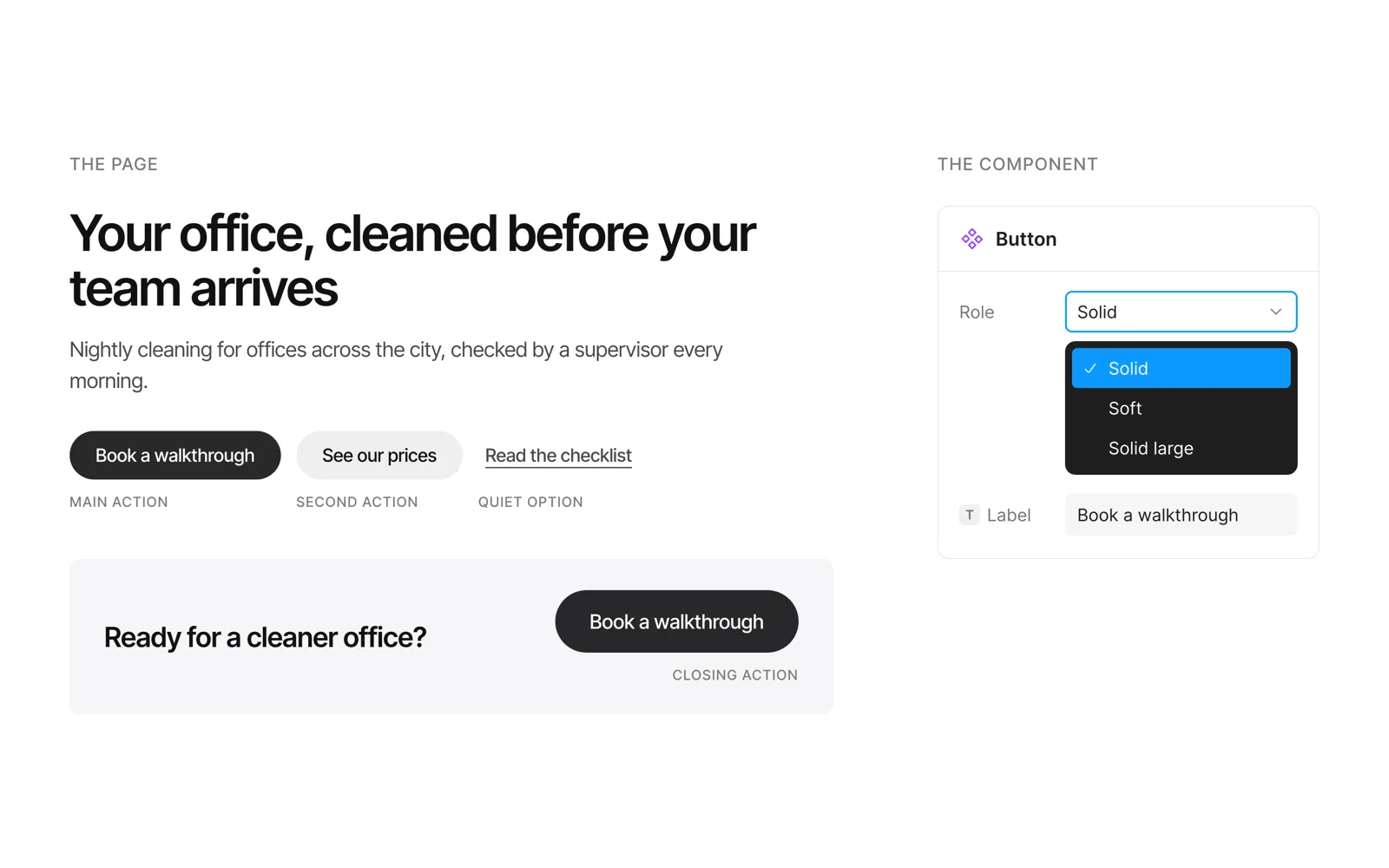
All three share one type style, which is Medium weight at 18px, one step above the 16px body text, in sentence case, and all three are fully round with no icons, so the only differences between them are the fill and the size. The solid button uses the page’s ink colour at nearly full strength and the soft one uses a light tint of the same colour, and that difference alone tells a visitor which action matters more.
Beside a hero button there is sometimes a quieter option, such as See case studies, and I keep that as an underlined link in the same type as the button’s label, so it sits level with the button and reads as the lightest choice on the screen.
One main action in each section
The hierarchy only works when each section has one solid button, so I would decide which action matters most in a section before choosing any styles, and then give everything else the soft style or a link. Two solid buttons side by side ask the visitor to choose between two actions which look equally important, and I think that slows down the one decision which the section was designed to make easy.
It’s the same idea as the calm defaults in my B2B dashboard design principles, where the loud treatment is kept for the one thing which needs attention, because a style which is used everywhere no longer tells the visitor where to look.
How I keep the hierarchy in Figma and in the build
In Figma I would make the button one component with a variant for each role, which is what Figma’s variants are for, so a designer picks Solid, Soft or Solid large from one menu and a new section has no reason to draw a button of its own. The label is a text property of the component, so the words change on each button while the style stays with the component, and the file keeps three buttons however many sections it has.
The build follows the same rule, so every button on the site uses one of three classes in the stylesheet, and the pages which were designed separately have their buttons swapped for the matching class when they are built. The stylesheet is then the only place where a button’s look is defined, so when I later took the drop shadow off every button, it was one change in one file.
Size and focus
Each button is 48px or 64px high, which is well above the 24 by 24 CSS pixels that WCAG 2.2 sets as the minimum target size, and each one shows a visible ring when it is reached with the keyboard, which is what the focus visible criterion asks for. On this site that ring had been invisible around the solid button, because it used the colour of the button’s label, which is also the colour of the page behind it, so the problem only showed when I moved through a page with the Tab key.
Where to start
I would open your home page and three other pages, take a screenshot of every button and put the screenshots side by side, and then write next to each one the job which it does. If two buttons with the same job look different, or two different jobs share a look, that is where your hierarchy has drifted, and I think most websites would find more than three styles on the first try.
Frequently asked questions
What is button hierarchy in web design?
Button hierarchy is the order of importance which the look of each button shows, so the main action on a screen has the strongest style, a second action is quieter and a link is quieter still. It helps a visitor see the next step without reading every label, which is why I would decide the order of the actions before designing the buttons.
How many button styles should a website have?
Mostly three, a solid style for the main action, a soft style for a second action and a larger solid style for the closing call to action, with plain links for anything quieter. Hover, pressed, focus and disabled belong to each style as its states, so they add no new styles to the set.
What is the difference between a primary and a secondary button?
The primary button is the one action which you most want a visitor to take in a section, so it has the strongest fill, and the secondary button offers the alternative beside it in a lighter style, such as See our prices beside Book a walkthrough. On this site those are the solid and the soft buttons, and each section has one primary button at most.
Should buttons have icons?
I leave icons off buttons, because an arrow on some buttons and not on others becomes one more style to keep consistent, and the words should already say where the button goes, which is why I write them before the design starts, as I explained in why website copy should come before the design. An icon earns its place on a control which has no room for words, such as a close button or the arrows of a slider.