Multi-Location Website Design and What a Copied Location Page Keeps
Location pages are mostly made by copying a page which already works, and the copy keeps the old location's phone number, links and settings where a quick read passes over them. What it keeps, and how I check each page.
 Mike Lopez
Designs and builds websites and B2B software
Mike Lopez
Designs and builds websites and B2B software

On this page
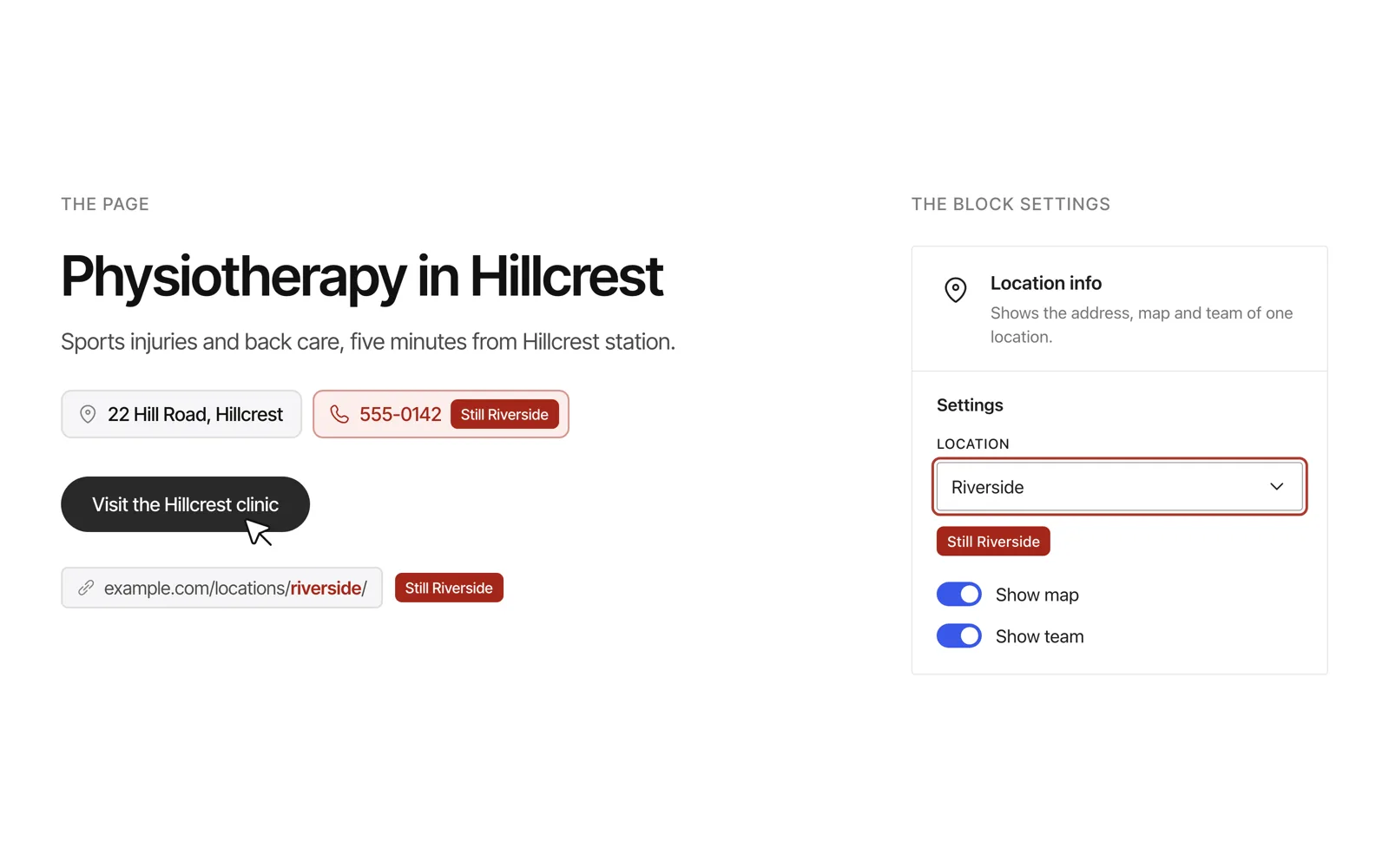
I think the location pages are the part of a multi-location website design which goes wrong most often, because each one is mostly made by copying a page which already works, and the copy keeps details from the location which it came from. The heading at the top is usually changed, but the phone number in the contact block, the link behind a button and the settings of a block can still belong to the original location, so a page can read perfectly and still send your customer to the wrong place.
It’s really a small mistake with a real cost, because a customer who calls the number on the page reaches another location, and a customer who follows the button to book may book at a location on the other side of the city.
Why location pages are copied
A multi-location website mostly has one page for each location, and often one page for each service at each location, so a business with eight locations and five services already needs forty pages. Those pages should share one layout, so designing the first page well and then copying it for the others is the right way to build them, in the same way that every one of my case studies uses one template and carries its own content.
The trouble is in what each copy keeps, because every location page has details which belong to that location alone, such as its name, address, phone number, hours, team, photos and the links to its own booking page, and a copy starts with every one of those set to the location which it came from.
What a copied page keeps, and where it hides
People change the headings first, since they are the first thing anyone reads, and the rest of the details sit in places which a quick read passes over.
| Detail | Where it hides | Why a quick read misses it |
|---|---|---|
| The location’s name | The team section, a paragraph near the end, the alt text of a photo | The title at the top was changed, so the page looks finished |
| Address and phone number | The contact block and the bottom of the page | People recognise a phone number by its shape and rarely read it digit by digit |
| Links behind buttons | Buttons such as Visit this location or Book now, and links to articles | The words on the button are right, and the web address behind them only shows on hover |
| Block settings | The setting which tells a block which location to show | It never appears as text, but it decides the sidebar, the map and the structured data |
| Photos | The background of the hero and the gallery | One reception room looks much like another |
| Search result text | The SEO title and the meta description | Both only appear in search results, so nobody sees them on the page |
The words further down the page
In one audit this year I compared 21 new location pages with their copy documents, and 9 of them still carried details of another location, because they had been copied from a page at that location and some of their sections were never updated. The team section of one page was still headed with the other location’s name, and the contact block of others showed the address and phone number of the location which they came from, while every title named the right location, so each page looked finished at first glance.
The links behind the buttons
Links are harder to catch, because the words on a button can be right while the web address behind them is wrong. On another set of 25 location pages this year, the button which opens the location’s own page pointed at the first location on 20 of them, because each new location had been copied from the one before it, so the wrong link travelled from the first location to the second and then on to the next, and it would have sent visitors in one state to a location in another state.
Three earlier rounds of checks had missed a similar fault in the links to articles, because those checks only read the text on each page, where the words had been changed and the links behind them had not.
The settings which never show
On one website a single setting tells a block which location to show, and that setting decides the sidebar, the internal links and the address and phone number in the page’s structured data, which is the markup that Google reads for a local business. On all five pages of one new location it still pointed at other locations, and I believe it’s the most important detail to check, because the structured data never shows on the page, so I would open the settings of every block which shows location details.
Photos and local details
Photos are copied with the page as well, and on one of those pages the photo of the room belonged to another location, which a customer would only notice on arrival. The words which make a page local are easy to miss in the same way, such as the neighbourhood or a nearby landmark, because a sentence written for one city still reads naturally on the page for another.
How I check a copied page before it goes live
I would start with a list of every location’s own details, with its name, street, phone number, email address, team and the web address of its page, because the mistake which I find most often is a page which kept another location’s details, and the list makes those easy to search for. Then I check every page in four passes.
- Search the page for the names, streets and phone numbers of every other location, which takes a few seconds with the browser’s find.
- Hover over every button and link and read the web address which appears in the corner of the browser, since the text of a link and the web address behind it are two separate things.
- Open the settings of each block which shows location details, such as a map, a sidebar or a team list, and check which location it points at.
- Compare the page with its copy document in both directions, which is the check I described in why website copy should come before the design, so every sentence in the document is on the page and nothing on the page came from another location.
The second pass is the one which I would never skip, because it’s the only one which finds a page that reads perfectly and still links to the wrong location.
What should be different on every location page
I think giving each location page its own details matters for search as well, because Google’s spam policies give pages “targeted at specific regions or cities that funnel users to one page” as an example of doorway abuse. So I would give every location page the details which only that location has, such as its address, hours, team, photos of the place itself, directions and reviews from its own customers, and then each page is useful on its own, and a detail left over from another location is easier to spot, because apart from the layout, everything on the page should belong to that location.
Where to start
If your business already has location pages, I would open each one in a private window, hover over every button and check that the web address in the corner of the browser names the same location as the page, and then search the page for the phone numbers of your other locations. It mostly takes a few minutes for each location, and it’s the quickest way to find the details which a copy kept before one of your customers does.
Frequently asked questions
How does multi-location website design work?
I would design one location page as a template, with a fixed place for every detail which changes from one location to the next, and then build each location’s page from it with its own details, which keeps the design consistent and the details easy to check, while the home page and the services describe the business as a whole.
Should each location have its own page or its own website?
Mostly its own page on one website, because the design, the booking and every update are then shared, and only the details of each location change. I think separate websites for each location drift apart over time, because every update has to be made once for each website.
Are duplicate location pages bad for SEO?
Pages which only swap the city name are close to what Google describes as doorway pages, so I would give each location page the details which belong to it alone. A shared layout is fine, and it’s really the content which should differ from page to page.
What should a location page include?
It should carry the location’s name, address, phone number, opening hours, directions, team, photos of the place and a way to book or contact that location directly, with the same address and phone number in the page’s structured data. If you are planning a new website, those details are worth collecting before the design starts, along with the other items in my website redesign checklist.